ralph-playbook
Ralph methodology playbook for autonomous AI coding loops — a guide to implementing self-correcting agent workflows
This playbook is a comprehensive guide to implementing Geoff Huntley's Ralph methodology for autonomous AI coding loops. It details a three-phase workflow, key principles like context management and backpressure, and loop mechanics for task selection and execution. The guide emphasizes iterative refinement and sandboxed environments for secure, self-correcting agent development.
- Three-phase workflow: define, plan, and build AI coding loops
- Key principles for context management and token efficiency
- Steering via backpressure: tests, typechecks, and custom validation
- Loop mechanics for single-task execution and persistent state
- Guidance on secure sandboxed environments for autonomous agents




README
View on GitHub ↗The Ralph Playbook
December 2025 boiled Ralph's powerful yet dumb little face to the top of most AI-related timelines.
I try to pay attention to the crazy-smart insights @GeoffreyHuntley shares, but I can't say Ralph really clicked for me this summer. Now, all of the recent hubbub has made it hard to ignore.
@mattpocockuk and @ryancarson's overviews helped a lot - right until Geoff came in and said 'nah'.

So what is the optimal way to Ralph?
Many folks seem to be getting good results with various shapes - but I wanted to read the tea leaves as closely as possible from the person who not only captured this approach but also has had the most ass-time in the seat putting it through its paces.
So I dug in to really RTFM on recent videos and Geoff's original post to try and untangle for myself what works best.
Below is the result - a (likely OCD-fueled) Ralph Playbook that organizes the miscellaneous details for putting this all into practice w/o hopefully neutering it in the process.
Digging into all of this has also brought to mind some possibly valuable additional enhancements to the core approach that aim to stay aligned with the guidelines that make Ralph work so well.
[!TIP] View as 📖 Formatted Guide →
Hope this helps you out - @ClaytonFarr
Table of Contents
Workflow
A picture is worth a thousand tweets and an hour-long video. Geoff's overview here (sign up to his newsletter to see full article) really helped clarify the workflow details for moving from 1) idea → 2) individual JTBD-aligned specs → 3) comprehensive implementation plan → 4) Ralph work loops.
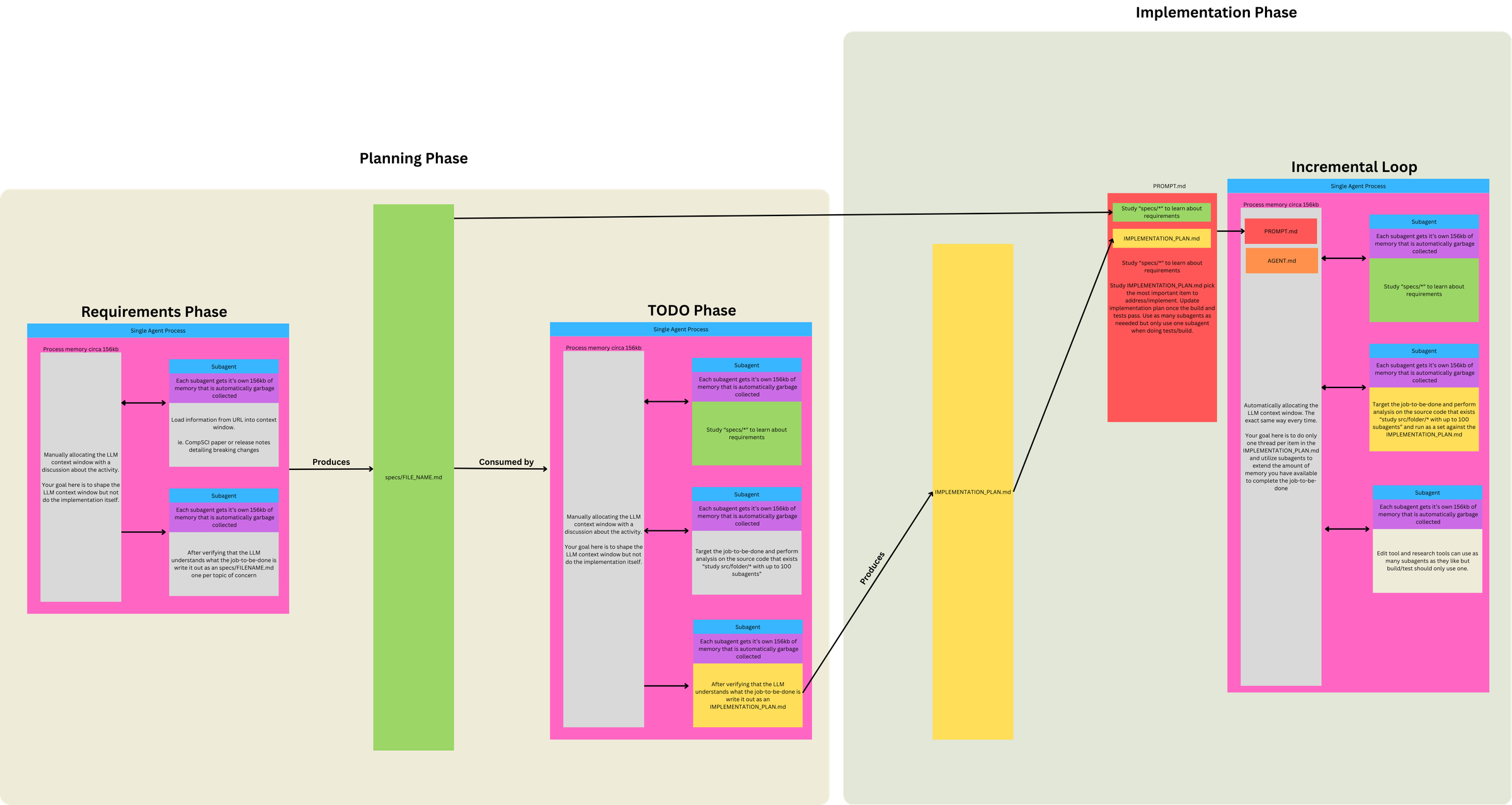
🗘 Three Phases, Two Prompts, One Loop
This diagram clarified for me that Ralph isn't just "a loop that codes." It's a funnel with 3 Phases, 2 Prompts, and 1 Loop.
Phase 1. Define Requirements (LLM conversation)
- Discuss project ideas → identify Jobs to Be Done (JTBD)
- Break individual JTBD into topic(s) of concern
- Use subagents to load info from URLs into context
- LLM understands JTBD topic of concern: subagent writes
specs/FILENAME.mdfor each topic
Phase 2 / 3. Run Ralph Loop (two modes, swap PROMPT.md as needed)
Same loop mechanism, different prompts for different objectives:
| Mode | When to use | Prompt focus |
|---|---|---|
| PLANNING | No plan exists, or plan is stale/wrong | Generate/update IMPLEMENTATION_PLAN.md only |
| BUILDING | Plan exists | Implement from plan, commit, update plan as side effect |
Prompt differences per mode:
- 'PLANNING' prompt does gap analysis (specs vs code) and outputs a prioritized TODO list—no implementation, no commits.
- 'BUILDING' prompt assumes plan exists, picks tasks from it, implements, runs tests (backpressure), commits.
Why use the loop for both modes?
- BUILDING requires it: inherently iterative (many tasks × fresh context = isolation)
- PLANNING uses it for consistency: same execution model, though often completes in 1-2 iterations
- Flexibility: if plan needs refinement, loop allows multiple passes reading its own output
- Simplicity: one mechanism for everything; clean file I/O; easy stop/restart
Context loaded each iteration: PROMPT.md + AGENTS.md
PLANNING mode loop lifecycle:
- Subagents study
specs/*and existing/src - Compare specs against code (gap analysis)
- Create/update
IMPLEMENTATION_PLAN.mdwith prioritized tasks - No implementation
BUILDING mode loop lifecycle:
- Orient – subagents study
specs/*(requirements) - Read plan – study
IMPLEMENTATION_PLAN.md - Select – pick the most important task
- Investigate – subagents study relevant
/src("don't assume not implemented") - Implement – N subagents for file operations
- Validate – 1 subagent for build/tests (backpressure)
- Update
IMPLEMENTATION_PLAN.md– mark task done, note discoveries/bugs - Update
AGENTS.md– if operational learnings - Commit
- Loop ends → context cleared → next iteration starts fresh
Concepts
| Term | Definition |
|---|---|
| Job to be Done (JTBD) | High-level user need or outcome |
| Topic of Concern | A distinct aspect/component within a JTBD |
| Spec | Requirements doc for one topic of concern (specs/FILENAME.md) |
| Task | Unit of work derived from comparing specs to code |
Relationships:
- 1 JTBD → multiple topics of concern
- 1 topic of concern → 1 spec
- 1 spec → multiple tasks (specs are larger than tasks)
Example:
- JTBD: "Help designers create mood boards"
- Topics: image collection, color extraction, layout, sharing
- Each topic → one spec file
- Each spec → many tasks in implementation plan
Topic Scope Test: "One Sentence Without 'And'"
- Can you describe the topic of concern in one sentence without conjoining unrelated capabilities?
- ✓ "The color extraction system analyzes images to identify dominant colors"
- ✗ "The user system handles authentication, profiles, and billing" → 3 topics
- If you need "and" to describe what it does, it's probably multiple topics
Key Principles
⏳ Context Is Everything
- When 200K+ tokens advertised = ~176K truly usable
- And 40-60% context utilization for "smart zone"
- Tight tasks + 1 task per loop = 100% smart zone context utilization
This informs and drives everything else:
- Use the main agent/context as a scheduler
- Don't allocate expensive work to main context; spawn subagents whenever possible instead
- Use subagents as memory extension
- Each subagent gets ~156kb that's garbage collected
- Fan out to avoid polluting main context
- Simplicity and brevity win
- Applies to number of parts in system, loop config, and content
- Verbose inputs degrade determinism
- Prefer Markdown over JSON
- To define and track work, for better token efficiency
🧭 Steering Ralph: Patterns + Backpressure
Creating the right signals & gates to steer Ralph's successful output is critical. You can steer from two directions:
- Steer upstream
- Ensure deterministic setup:
- Allocate first ~5,000 tokens for specs
- Every loop's context is allocated with the same files so model starts from known state (
PROMPT.md+AGENTS.md)
- Your existing code shapes what gets used and generated
- If Ralph is generating wrong patterns, add/update utilities and existing code patterns to steer it toward correct ones
- Ensure deterministic setup:
- Steer downstream
- Create backpressure via tests, typechecks, lints, builds, etc. that will reject invalid/unacceptable work
- Prompt says "run tests" generically.
AGENTS.mdspecifies actual commands to make backpressure project-specific - Backpressure can extend beyond code validation: some acceptance criteria resist programmatic checks - creative quality, aesthetics, UX feel. LLM-as-judge tests can provide backpressure for subjective criteria with binary pass/fail. (More detailed thoughts below on how to approach this with Ralph.)
- Remind Ralph to create/use backpressure
- Remind Ralph to use backpressure when implementing: "Important: When authoring documentation, capture the why — tests and implementation importance."
🙏 Let Ralph Ralph
Ralph's effectiveness comes from how much you trust it do the right thing (eventually) and engender its ability to do so.
- Let Ralph Ralph
- Lean into LLM's ability to self-identify, self-correct and self-improve
- Applies to implementation plan, task definition and prioritization
- Eventual consistency achieved through iteration
- Use protection
- To operate autonomously, Ralph requires
--dangerously-skip-permissions- asking for approval on every tool call would break the loop. This bypasses Claude's permission system entirely - so a sandbox becomes your only security boundary. - Philosophy: "It's not if it gets popped, it's when. And what is the blast radius?"
- Running without a sandbox exposes credentials, browser cookies, SSH keys, and access tokens on your machine
- Run in isolated environments with minimum viable access:
- Only the API keys and deploy keys needed for the task
- No access to private data beyond requirements
- Restrict network connectivity where possible
- Options: Docker sandboxes (local), Fly Sprites/E2B/etc. (remote/production) - additional notes
- Additional escape hatches: Ctrl+C stops the loop;
git reset --hardreverts uncommitted changes; regenerate plan if trajectory goes wrong
- To operate autonomously, Ralph requires
🚦 Move Outside the Loop
To get the most out of Ralph, you need to get out of his way. Ralph should be doing all of the work, including decided which planned work to implement next and how to implement it. Your job is now to sit on the loop, not in it - to engineer the setup and environment that will allow Ralph to succeed.
Observe and course correct – especially early on, sit and watch. What patterns emerge? Where does Ralph go wrong? What signs does he need? The prompts you start with won't be the prompts you end with - they evolve through observed failure patterns.
Tune it like a guitar – instead of prescribing everything upfront, observe and adjust reactively. When Ralph fails a specific way, add a sign to help him next time.
But signs aren't just prompt text. They're anything Ralph can discover:
- Prompt guardrails - explicit instructions like "don't assume not implemented"
AGENTS.md- operational learnings about how to build/test- Utilities in your codebase - when you add a pattern, Ralph discovers it and follows it
- Other discoverable, relevant inputs…
[!TIP]
- try starting with nothing in
AGENTS.md(empty file; no best practices, etc.)- spot-test desired actions, find missteps (walkthrough example from Geoff)
- watch initial loops, see where gaps occur
- tune behavior only as needed, via AGENTS updates and/or code patterns (shared utilities, etc.)
And remember, the plan is disposable:
- If it's wrong, throw it out, and start over
- Regeneration cost is one Planning loop; cheap compared to Ralph going in circles
- Regenerate when:
- Ralph is going off track (implementing wrong things, duplicating work)
- Plan feels stale or doesn't match current state
- Too much clutter from completed items
- You've made significant spec changes
- You're confused about what's actually done
Loop Mechanics
I. Task Selection
loop.sh acts in effect as an 'outer loop' where each loop = a single task (in separate sessions). When the task is completed, loop.sh kicks off a fresh session to select the next task, if any remaining tasks are available.
Geoff's initial minimal form of loop.sh script:
while :; do cat PROMPT.md | claude ; done
Note: The same approach can be used with other CLIs; e.g. amp, codex, opencode, etc.
What controls task continuation?
The continuation mechanism is elegantly simple:
- Bash loop runs → feeds
PROMPT.mdto claude - PROMPT.md instructs → "Study IMPLEMENTATION_PLAN.md and choose the most important thing..."
- Agent completes one task → updates IMPLEMENTATION_PLAN.md on disk, commits, exits
- Bash loop restarts immediately → fresh context window
- Agent reads updated plan → picks next most important thing...
Key insight: The IMPLEMENTATION_PLAN.md file persists on disk between iterations and acts as shared state between otherwise isolated loop executions. Each iteration deterministically loads the same files (PROMPT.md + AGENTS.md + specs/*) and reads the current state from disk.
No sophisticated orchestration needed - just a dumb bash loop that keeps restarting the agent, and the agent figures out what to do next by reading the plan file each time.
II. Task Execution
Each task is prompted to keep doing its work against backpressure (tests, etc) until it passes - creating a pseudo inner 'loop' (in single session).
This inner loop is just internal self-correction / iterative reasoning within one long model response, powered by backpressure prompts, tool use, and subagents. It's not a loop in the programming sense.
A single task execution has no hard technical limit. Control relies on:
- Scope discipline - PROMPT.md instructs "one task" and "commit when tests pass"
- Backpressure - tests/build failures force the agent to fix issues before committing
- Natural completion - agent exits after successful commit
Ralph can go in circles, ignore instructions, or take wrong directions - this is expected and part of the tuning process. When Ralph "tests you" by failing in specific ways, you add guardrails to the prompt or adjust backpressure mechanisms. The nondeterminism is manageable through observation and iteration.
Enhanced loop.sh Example
Wraps core loop with mode selection (plan/build), with max-iterations for max number of tasks to complete, and git push after each iteration.
This enhancement uses two saved prompt files:
PROMPT_plan.md- Planning mode (gap analysis, generates/updates plan)PROMPT_build.md- Building mode (implements from plan)
#!/bin/bash
# Usage: ./loop.sh [plan|build] [max_iterations]
# Examples:
#   ./loop.sh              # Build mode, unlimited tasks
#   ./loop.sh 20           # Build mode, max 20 tasks
#   ./loop.sh build 20     # Build mode, max 20 tasks
#   ./loop.sh plan         # Plan mode, unlimited tasks
#   ./loop.sh plan 5       # Plan mode, max 5 tasks

# Parse arguments
if [ "$1" = "plan" ]; then
    # Plan mode
    MODE="plan"
    PROMPT_FILE="PROMPT_plan.md"
    MAX_ITERATIONS=${2:-0}
elif [ "$1" = "build" ]; then
    # Explicit build mode (with optional max iterations)
    MODE="build"
    PROMPT_FILE="PROMPT_build.md"
    MAX_ITERATIONS=${2:-0}
elif [[ "$1" =~ ^[0-9]+$ ]]; then
    # Build mode with max tasks (bare number)
    MODE="build"
    PROMPT_FILE="PROMPT_build.md"
    MAX_ITERATIONS=$1
else
    # Build mode, unlimited (no arguments or invalid input)
    MODE="build"
    PROMPT_FILE="PROMPT_build.md"
    MAX_ITERATIONS=0
fi

ITERATION=0
CURRENT_BRANCH=$(git branch --show-current)

echo "━━━━━━━━━━━━━━━━━━━━━━━━━━━━━━━━━━━━━━━━"
echo "Mode:   $MODE"
echo "Prompt: $PROMPT_FILE"
echo "Branch: $CURRENT_BRANCH"
[ $MAX_ITERATIONS -gt 0 ] && echo "Max:    $MAX_ITERATIONS iterations (number of tasks)"
echo "━━━━━━━━━━━━━━━━━━━━━━━━━━━━━━━━━━━━━━━━"

# Verify prompt file exists
if [ ! -f "$PROMPT_FILE" ]; then
    echo "Error: $PROMPT_FILE not found"
    exit 1
fi

while true; do
    if [ $MAX_ITERATIONS -gt 0 ] && [ $ITERATION -ge $MAX_ITERATIONS ]; then
        echo "Reached max iterations (number of tasks): $MAX_ITERATIONS"
        break
    fi

    # Run Ralph iteration with selected prompt
    # -p: Headless mode (non-interactive, reads from stdin)
    # --dangerously-skip-permissions: Auto-approve all tool calls (YOLO mode)
    # --output-format=stream-json: Structured output for logging/monitoring
    # --model opus: Primary agent uses Opus for complex reasoning (task selection, prioritization)
    #               Can use 'sonnet' in build mode for speed if plan is clear and tasks well-defined
    # --verbose: Detailed execution logging
    cat "$PROMPT_FILE" | claude -p \
        --dangerously-skip-permissions \
        --output-format=stream-json \
        --model opus \
        --verbose

    # Push changes after each iteration
    git push origin "$CURRENT_BRANCH" || {
        echo "Failed to push. Creating remote branch..."
        git push -u origin "$CURRENT_BRANCH"
    }

    ITERATION=$((ITERATION + 1))
    echo -e "\n\n======================== LOOP $ITERATION ========================\n"
done
Mode selection:
- No keyword → Uses
PROMPT_build.mdfor building (implementation) plankeyword → UsesPROMPT_plan.mdfor planning (gap analysis, plan generation)
Max-iterations:
- Limits the task selection loop (number of tasks attempted; NOT tool calls within a single task)
- Each iteration = one fresh context window = one task from IMPLEMENTATION_PLAN.md = one commit
./loop.shruns unlimited (manual stop with Ctrl+C)./loop.sh 20runs max 20 iterations then stops
Claude CLI flags:
-p(headless mode): Enables non-interactive operation, reads prompt from stdin--dangerously-skip-permissions: Bypasses all permission prompts for fully automated runs--output-format=stream-json: Outputs structured JSON for logging/monitoring/visualization--model opus: Primary agent uses Opus for task selection, prioritization, and coordination (can usesonnetfor speed if tasks are clear)--verbose: Provides detailed execution logging
Streamed Output Variant
An alternative loop_streamed.sh that pipes Claude's raw JSON output through parse_stream.js for readable, color-coded terminal display showing tool calls, results, and execution stats.
Differences from base loop.sh:
- Passes prompt as argument (
-p "$FULL_PROMPT") instead of stdin pipe - Adds
--include-partial-messagesfor real-time streaming - Pipes output through
parse_stream.js(Node.js, no dependencies) - Appends "Execute the instructions above." to prompt content
Files: loop_streamed.sh · parse_stream.js
— contributed by @terry-xyz · @blackrosesxyz
License
This repository is available under the MIT License.
Third-party screenshots and externally sourced images are excluded unless explicitly noted otherwise. See NOTICE for details.
Files
project-root/
├── loop.sh                         # Ralph loop script
├── PROMPT_build.md                 # Build mode instructions
├── PROMPT_plan.md                  # Plan mode instructions
├── AGENTS.md                       # Operational guide loaded each iteration
├── IMPLEMENTATION_PLAN.md          # Prioritized task list (generated/updated by Ralph)
├── specs/                          # Requirement specs (one per JTBD topic)
│   ├── [jtbd-topic-a].md
│   └── [jtbd-topic-b].md
├── src/                            # Application source code
└── src/lib/                        # Shared utilities & components
loop.sh
The primary loop script that orchestrates Ralph iterations.
See Loop Mechanics section for detailed implementation examples and configuration options.
Setup: Make the script executable before first use:
chmod +x loop.sh
Core function: Continuously feeds prompt file to Claude, manages iteration limits, and pushes changes after each task completion.
PROMPTS
The instruction set for each loop iteration. Swap between PLANNING and BUILDING versions as needed.
Prompt Structure:
| Section | Purpose |
|---|---|
| Phase 0 (0a, 0b, 0c) | Orient: study specs, source location, current plan |
| Phase 1-4 | Main instructions: task, validation, commit |
| 999... numbering | Guardrails/invariants (higher number = more critical) |
Key Language Patterns (Geoff's specific phrasing):
- "study" (not "read" or "look at")
- "don't assume not implemented" (critical - the Achilles' heel)
- "using parallel subagents" / "up to N subagents"
- "only 1 subagent for build/tests" (backpressure control)
- "Think extra hard" (now "Ultrathink")
- "capture the why"
- "keep it up to date"
- "if functionality is missing then it's your job to add it"
- "resolve them or document them"
PROMPT_plan.md Template
Notes:
- Update [project-specific goal] placeholder below.
- Current subagents names presume using Claude.
0a. Study `specs/*` with up to 250 parallel Sonnet subagents to learn the application specifications.
0b. Study @IMPLEMENTATION_PLAN.md (if present) to understand the plan so far.
0c. Study `src/lib/*` with up to 250 parallel Sonnet subagents to understand shared utilities & components.
0d. For reference, the application source code is in `src/*`.

1. Study @IMPLEMENTATION_PLAN.md (if present; it may be incorrect) and use up to 500 Sonnet subagents to study existing source code in `src/*` and compare it against `specs/*`. Use an Opus subagent to analyze findings, prioritize tasks, and create/update @IMPLEMENTATION_PLAN.md as a bullet point list sorted in priority of items yet to be implemented. Ultrathink. Consider searching for TODO, minimal implementations, placeholders, skipped/flaky tests, and inconsistent patterns. Study @IMPLEMENTATION_PLAN.md to determine starting point for research and keep it up to date with items considered complete/incomplete using subagents.

IMPORTANT: Plan only. Do NOT implement anything. Do NOT assume functionality is missing; confirm with code search first. Treat `src/lib` as the project's standard library for shared utilities and components. Prefer consolidated, idiomatic implementations there over ad-hoc copies.

ULTIMATE GOAL: We want to achieve [project-specific goal]. Consider missing elements and plan accordingly. If an element is missing, search first to confirm it doesn't exist, then if needed author the specification at specs/FILENAME.md. If you create a new element then document the plan to implement it in @IMPLEMENTATION_PLAN.md using a subagent.
PROMPT_build.md Template
Note: Current subagents names presume using Claude.
0a. Study `specs/*` with up to 500 parallel Sonnet subagents to learn the application specifications.
0b. Study @IMPLEMENTATION_PLAN.md.
0c. For reference, the application source code is in `src/*`.

1. Your task is to implement functionality per the specifications using parallel subagents. Follow @IMPLEMENTATION_PLAN.md and choose the most important item to address. Before making changes, search the codebase (don't assume not implemented) using Sonnet subagents. You may use up to 500 parallel Sonnet subagents for searches/reads and only 1 Sonnet subagent for build/tests. Use Opus subagents when complex reasoning is needed (debugging, architectural decisions).
2. After implementing functionality or resolving problems, run the tests for that unit of code that was improved. If functionality is missing then it's your job to add it as per the application specifications. Ultrathink.
3. When you discover issues, immediately update @IMPLEMENTATION_PLAN.md with your findings using a subagent. When resolved, update and remove the item.
4. When the tests pass, update @IMPLEMENTATION_PLAN.md, then `git add -A` then `git commit` with a message describing the changes. After the commit, `git push`.

99999. Important: When authoring documentation, capture the why — tests and implementation importance.
999999. Important: Single sources of truth, no migrations/adapters. If tests unrelated to your work fail, resolve them as part of the increment.
9999999. As soon as there are no build or test errors create a git tag. If there are no git tags start at 0.0.0 and increment patch by 1 for example 0.0.1  if 0.0.0 does not exist.
99999999. You may add extra logging if required to debug issues.
999999999. Keep @IMPLEMENTATION_PLAN.md current with learnings using a subagent — future work depends on this to avoid duplicating efforts. Update especially after finishing your turn.
9999999999. When you learn something new about how to run the application, update @AGENTS.md using a subagent but keep it brief. For example if you run commands multiple times before learning the correct command then that file should be updated.
99999999999. For any bugs you notice, resolve them or document them in @IMPLEMENTATION_PLAN.md using a subagent even if it is unrelated to the current piece of work.
999999999999. Implement functionality completely. Placeholders and stubs waste efforts and time redoing the same work.
9999999999999. When @IMPLEMENTATION_PLAN.md becomes large periodically clean out the items that are completed from the file using a subagent.
99999999999999. If you find inconsistencies in the specs/* then use an Opus 4.6 subagent with 'ultrathink' requested to update the specs.
999999999999999. IMPORTANT: Keep @AGENTS.md operational only — status updates and progress notes belong in `IMPLEMENTATION_PLAN.md`. A bloated AGENTS.md pollutes every future loop's context.
AGENTS.md
Single, canonical "heart of the loop" - a concise, operational "how to run/build" guide.
- NOT a changelog or progress diary
- Describes how to build/run the project
- Captures operational learnings that improve the loop
- Keep brief (~60 lines)
Status, progress, and planning belong in IMPLEMENTATION_PLAN.md, not here.
Loopback / Immediate Self-Evaluation:
AGENTS.md should contain the project-specific commands that enable loopback - the ability for Ralph to immediately evaluate his work within the same loop. This includes:
- Build commands
- Test commands (targeted and full suite)
- Typecheck/lint commands
- Any other validation tools
The BUILDING prompt says "run tests" generically; AGENTS.md specifies the actual commands. This is how backpressure gets wired in per-project.
Example
## Build & Run

Succinct rules for how to BUILD the project:

## Validation

Run these after implementing to get immediate feedback:

- Tests: `[test command]`
- Typecheck: `[typecheck command]`
- Lint: `[lint command]`

## Operational Notes

Succinct learnings about how to RUN the project:

...

### Codebase Patterns

...
IMPLEMENTATION_PLAN.md
Prioritized bullet-point list of tasks derived from gap analysis (specs vs code) - generated by Ralph.
- Created via PLANNING mode
- Updated during BUILDING mode (mark complete, add discoveries, note bugs)
- Can be regenerated – Geoff: "I have deleted the TODO list multiple times" → switch to PLANNING mode
- Self-correcting – BUILDING mode can even create new specs if missing
The circularity is intentional: eventual consistency through iteration.
No pre-specified template - let Ralph/LLM dictate and manage format that works best for it.
specs/*
One markdown file per topic of concern. These are the source of truth for what should be built.
- Created during Requirements phase (human + LLM conversation)
- Consumed by both PLANNING and BUILDING modes
- Can be updated if inconsistencies discovered (rare, use subagent)
No pre-specified template - let Ralph/LLM dictate and manage format that works best for it.
src/ and src/lib/
Application source code and shared utilities/components.
Referenced in PROMPT.md templates for orientation steps.
Enhancements?
I'm still determining the value/viability of these, but the opportunities sound promising:
- Claude's AskUserQuestionTool for Planning - use Claude's built-in interview tool to systematically clarify JTBD, edge cases, and acceptance criteria for specs.
- Acceptance-Driven Backpressure - Derive test requirements during planning from acceptance criteria. Prevents "cheating" - can't claim done without appropriate tests passing.
- Non-Deterministic Backpressure - Using LLM-as-judge for tests against subjective tasks (tone, aesthetics, UX). Binary pass/fail reviews that iterate until pass.
- Ralph-Friendly Work Branches - Asking Ralph to "filter to feature X" at runtime is unreliable. Instead, create scoped plan per branch upfront.
- JTBD → Story Map → SLC Release - Push the power of "Letting Ralph Ralph" to connect JTBD's audience and activities to Simple/Lovable/Complete releases.
- Specs Audit - Dedicated mode for generating/maintaining specs with quality rules: behavioral outcomes only, topic scoping, consistent naming.
- Reverse Engineering Brownfield Projects to Specs - Bring brownfield codebases into Ralph's workflow by reverse-engineering existing code into specs before planning new work.
Use Claude's AskUserQuestionTool for Planning
During Phase 1 (Define Requirements), use Claude's built-in AskUserQuestionTool to systematically explore JTBD, topics of concern, edge cases, and acceptance criteria through structured interview before writing specs.
When to use: Minimal/vague initial requirements, need to clarify constraints, or multiple valid approaches exist.
Invoke: "Interview me using AskUserQuestion to understand [JTBD/topic/acceptance criteria/...]"
Claude will ask targeted questions to clarify requirements and ensure alignment before producing `s
Similar templates
learn-claude-code
Agent harness engineering tutorial — build the environment and tools for real LLM agents, inspired by Claude Code


claude-code-templates
Claude Code template manager — CLI to browse, install, and monitor agents, commands, and MCPs


claude-code-system-prompts
Claude Code system prompts — up-to-date collection of all internal prompts for subagents, tools, and utilities


claude-code-infrastructure-showcase
Claude Code infrastructure showcase for auto-activating skills, modular patterns, and specialized agents

