viwo
Agent workspace manager for Claude Code — runs agents in isolated git worktrees and Docker containers
VIWO provides isolated development sessions for Claude Code agents, preventing branch clutter and limiting agent access to your host environment. It combines git worktrees for branch isolation, Docker containers for runtime isolation, and an agent harness for managing agent lifecycles. Supports project-specific viwo.yml configs for setup, auth forwarding, and prompt expansion from GitHub/GitLab issues.
- Isolated workspaces with dedicated git worktrees and containers
- Fast agent launches into pre-configured, project-aware environments
- Parallel agent sessions against the same repository without conflicts
- Configurable viwo.yml for host/container setup and custom bind mounts
- Expand GitHub/GitLab issues directly into agent prompts


README
View on GitHub ↗VIWO
git worktree + containerization + agent harness
Run coding agents in isolated git worktrees backed by disposable containers.

VIWO creates clean, isolated development sessions so you can let an agent work without cluttering your current branch or granting it access to your everyday shell.
Each session combines:
- Git worktrees for branch isolation
- Containers for runtime isolation
- An agent harness for launching and managing coding agents
Today, the primary runtime is Claude Code inside Docker, with VIWO handling worktree creation, container lifecycle, auth forwarding, prompt expansion, and session cleanup.
Why VIWO
- Isolated workspaces: Every session gets its own git worktree and containerized runtime.
- Fast agent launches: Start a workspace and hand it to Claude Code in one command.
- Safe parallel work: Run multiple agent sessions against the same repository without polluting your current branch.
- Project-aware setup: Configure host-side setup, in-container setup, and custom bind mounts with
viwo.yml. - Better auth support: Use either an Anthropic API key or Claude subscription OAuth credentials.
- Issue-driven workflows: Expand GitHub issues and GitLab issues/MRs directly into the prompt.
- Attach anytime: Reconnect to a running session through
dtachin the container. - Session visibility: Sync Docker state, inspect running/completed sessions, and capture container output.
Table of Contents
- Installation
- Quick Start
- Project Configuration
- How it works
- Authentication
- GitHub and GitLab integration
- Security
- Development
- CLI Usage
- Architecture
- Uninstall
Installation
macOS & Linux
curl -fsSL https://raw.githubusercontent.com/OverseedAI/viwo/main/install.sh | bash
Windows
irm https://raw.githubusercontent.com/OverseedAI/viwo/main/install.ps1 | iex
You may need to restart your terminal after installation so viwo is available on your PATH.
Quick Start
# 1) Configure authentication
viwo auth

# 2) Add a repository
cd /path/to/your/repo
viwo repo add .

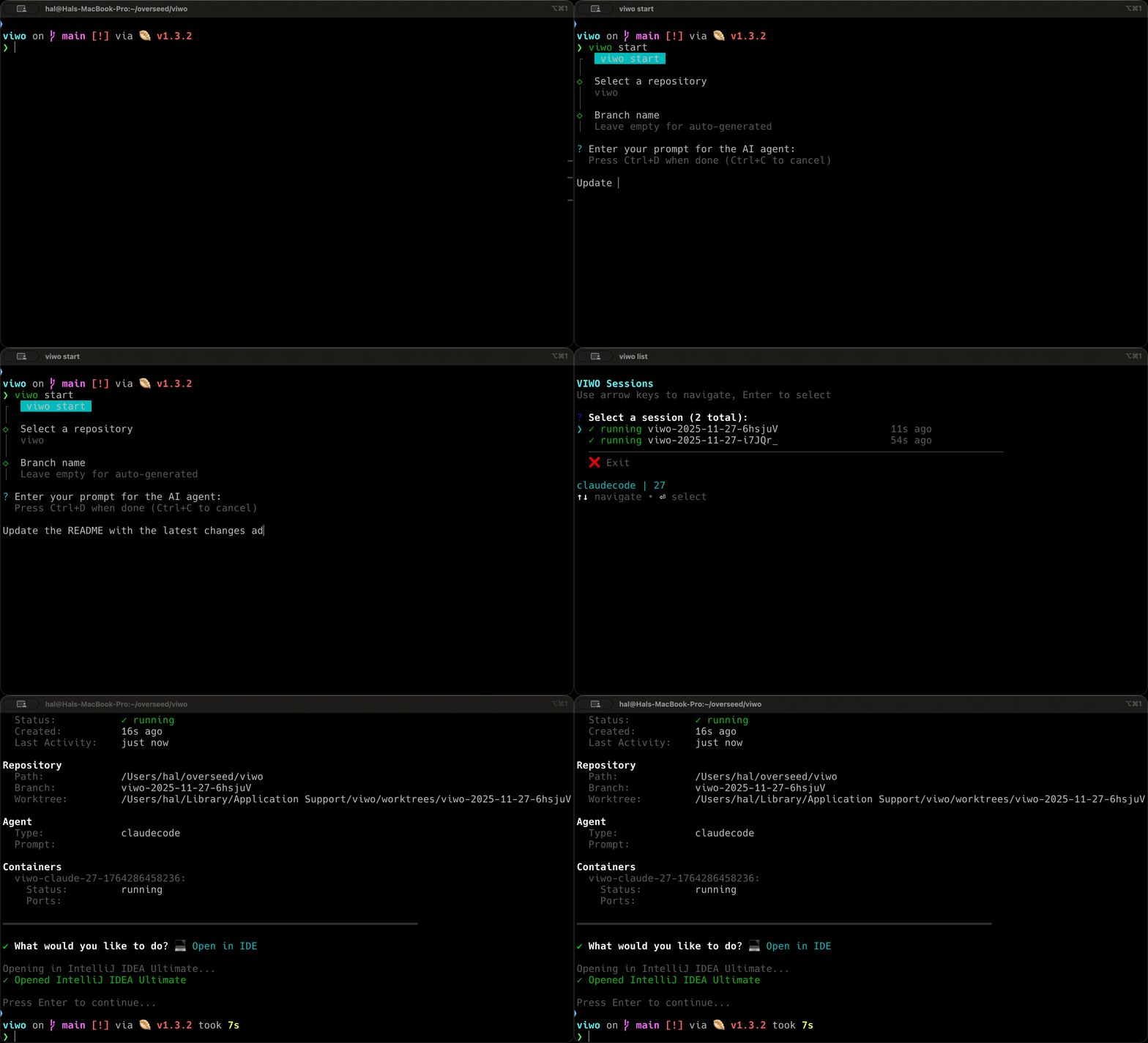
# 3) Start an isolated workspace + agent
viwo start

# 4) List sessions
viwo list

# 5) Attach to a running session
viwo attach
Notes:
viwo registerstill works as an alias forviwo repo add.- If you want to create the worktree first and launch the agent later, use
viwo create.
Project Configuration
VIWO loads project-specific configuration from viwo.yml or viwo.yaml at the repository root.
Example:
postInstall:
  - cp .env.example .env

preAgent:
  - bun install
  - bun run build

binds:
  - ~/.cache/huggingface:/root/.cache/huggingface
  - ./shared-data:/shared:ro
  - source: ~/models
    target: /models
    readonly: true
Post-install hooks
Use postInstall for commands that should run on the host after the git worktree is created and before any container starts.
Typical uses:
- copying env files
- generating local config
- host-side setup steps
postInstall:
  - npm install
  - npm run build
  - cp .env.example .env
Pre-agent commands
Use preAgent for commands that should run inside the container before Claude Code starts.
Typical uses:
- installing dependencies
- building the project
- preparing tools the agent will need during the session
preAgent:
  - bun install
  - bun run build
Custom bind mounts
Use binds to expose additional host directories inside the container.
This is useful for:
- caches
- datasets
- model files
- shared tooling or credentials that should be mounted read-only
Host paths may be absolute, use ~, or be relative to the repository root. Container paths must be absolute.
binds:
  - ~/.cache/huggingface:/root/.cache/huggingface
  - ./shared-data:/shared:ro
  - source: ~/models
    target: /models
    readonly: true
How it works
VIWO orchestrates a session in two main phases:
Create a worktree
- validate the repository
- create a new git branch + worktree
- copy env files if requested
- run project
postInstallhooks on the host
Start the agent container
- resolve auth and model settings
- expand GitHub/GitLab URLs in the prompt
- apply configured bind mounts
- run project
preAgentcommands inside the container - launch Claude Code in the isolated runtime
A few implementation details matter:
- The container sees the worktree at
/workspace. - Git metadata is mounted separately so git operations inside the container work correctly.
- Docker state is synced back to VIWO so session status and container output stay accurate.
- Completed or errored sessions can be cleaned up with
viwo clean.
Authentication
VIWO supports two auth modes:
Anthropic API key
Store an API key in VIWO and pass it into the container as needed.
viwo auth
Claude subscription OAuth
If you use Claude Code with a Claude subscription, VIWO can extract OAuth credentials from your host machine at session start and forward them into the container.
This avoids manually storing short-lived OAuth credentials in VIWO's database.
GitHub and GitLab integration
VIWO can detect supported GitHub issue URLs and GitLab issue / merge request URLs in your prompt, fetch their content, and expand the prompt automatically before launching the agent.
You can configure provider tokens with:
viwo config github
viwo config gitlab
This is useful when you want the agent to work directly from:
- GitHub issues
- GitLab issues
- GitLab merge requests
Security
Running agents with reduced interactive friction still carries risk. VIWO uses containers to reduce the blast radius, but containers are not the same thing as a hardened VM boundary.
In practice, VIWO's model is:
- git worktree isolation for source changes
- container isolation for runtime behavior
- explicit bind mounts for any extra host access
If you need stronger isolation guarantees, a VM-based workflow is safer than containers alone.
For more on Docker's security model, see the Docker docs: https://docs.docker.com/engine/security/
Development
Prerequisites
- Bun
- Git
- Docker
Install dependencies
git clone <repository-url>
cd viwo
bun install
Running the CLI
No build step is required during development.
# Run directly from source
bun packages/cli/src/cli.ts --help

# Or from the CLI package
cd packages/cli
bun run viwo --help
Type checking
bun run typecheck
cd packages/core && bun run typecheck
Testing
cd packages/core && bun test
Code quality
bun run format
bun run format:check
bun run lint
Build
bun run build
CLI Usage
Common commands:
# Repository management
viwo repo add .
viwo repo list --json
viwo repo delete <id>

# Auth and config
viwo auth
viwo config model --set opus
viwo config ide --set vscode
viwo config worktrees --set /path/to/worktrees
viwo config github --auto
viwo config gitlab --auto

# Workspace lifecycle
viwo create --repo <id> --branch feature/test
viwo start --repo <id> --prompt "Fix the failing tests"
viwo start --repo <id> --prompt-file ./prompt.txt
viwo list
viwo attach <workspace-id>
viwo clean
Architecture
VIWO is a monorepo with two main packages:
@viwo/core
The core SDK manages the session lifecycle:
- git worktree creation and cleanup
- Docker container orchestration
- agent initialization
- repository and session persistence
- configuration and credential handling
- GitHub / GitLab prompt expansion
- project config parsing for
viwo.yml
Key architectural traits:
- functional manager pattern for core subsystems
- schema-first validation with Zod
- SQLite + Drizzle ORM for persisted state
- direct TypeScript source exports during development
@viwo/cli
The CLI sits on top of @viwo/core and provides:
- interactive and non-interactive command flows
- session inspection and attach flows
- config and auth management
- preflight checks for database, git, Docker, and version status
Uninstall
Linux & macOS
rm /usr/local/bin/viwo
Windows
Remove-Item "$env:LOCALAPPDATA\Programs\viwo\viwo.exe"
Similar agent sdks
hermes-agent
Self-improving AI agent platform — autonomously creates skills, learns from experience, runs anywhere


OpenHands
AI agent SDK for autonomous software development — self-hosted alternative to Devin and Jules


aider
AI pair programming agent for your terminal — integrates with Claude, maps codebase, automates git commits


openclaude
Coding agent CLI for unified workflows across OpenAI, Gemini, Ollama, and Claude Code models


