CCNotify
Desktop notifications Claude hook — alerts when Claude needs input or completes tasks, with click-to-jump
CCNotify provides desktop notifications for Claude Code, alerting developers when Claude requires input or finishes tasks. It tracks session activity, records start and end times, and provides clickable notifications to jump back to the corresponding project in VS Code. This hook currently supports macOS and integrates via standard Claude Code hook events.
- Desktop alerts for Claude input requests
- Notifications for task completion with duration
- Clickable alerts jump to VS Code project
- Logs all Claude activity and session data locally
- macOS compatibility via terminal-notifier


README
View on GitHub ↗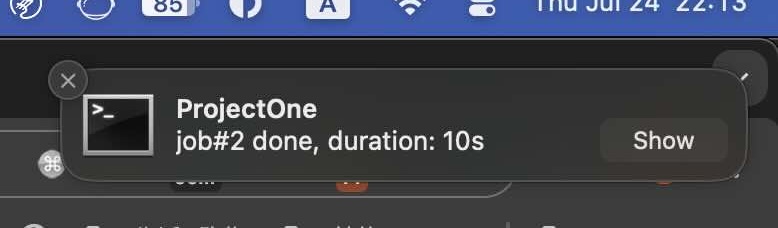
CCNotify
CCNotify provides desktop notifications for Claude Code, alerting you when Claude needs your input or completes tasks.
Important Notes
Starting from claude-code v1.0.95 (2025-08-31), any invalid settings in ~/.claude/settings.json will disable hooks. See Why not working for solutions.
Features
- 🔔 Get notified when Claude requires your input or completes a task.
- 🔗 Click to jump back when notifications are clicked, automatically taking you to the corresponding project in VS Code.
- ⏱️ Task Duration: Displays started time, and how long the task took to complete
Note: Currently compatible with macOS only.
Installation Guide
1. Install CCNotify
# Create the directory if it doesn't exist
mkdir -p ~/.claude/ccnotify

# soft link ccnotify.py to the directory
ln -f ccnotify.py ~/.claude/ccnotify/

chmod a+x ~/.claude/ccnotify/ccnotify.py

# run this script, should print: ok
~/.claude/ccnotify/ccnotify.py

ok
2. Install terminal-notifier
ccnotify uses terminal-notifier for macOS notifications. Install it using Homebrew:
brew install terminal-notifier
For alternative installation methods and more information, visit: https://github.com/julienXX/terminal-notifier
3. Configure Claude Hooks
Add the following hooks to your Claude configuration to enable ccnotify:
~/.claude/settings.json
  "hooks": {
  "UserPromptSubmit": [
    {
      "hooks": [
        {
          "type": "command",
          "command": "~/.claude/ccnotify/ccnotify.py UserPromptSubmit"
        }
      ]
    }
  ],
  "Stop": [
    {
      "hooks": [
        {
          "type": "command",
          "command": "~/.claude/ccnotify/ccnotify.py Stop"
        }
      ]
    }
  ],
  "Notification": [
    {
      "hooks": [
        {
          "type": "command",
          "command": "~/.claude/ccnotify/ccnotify.py Notification"
        }
      ]
    }
  ]
}
Try It Out
To verify the notification system works, start a new Claude Code session and run:
after 1 second, echo 'hello'
You should see a macOS notification appear.
Why not working
- Ensure hooks configuration is active. Here's an example where other configurations prevent hooks from working:
claude -p --model haiku -d hooks --verbose "hi"
Expected output:
[DEBUG] Found 1 hook commands to execute
[DEBUG] Executing hook command: ~/.claude/ccnotify/ccnotify.py UserPromptSubmit with timeout 60000ms
[DEBUG] Hook command completed with status 0: ~/.claude/ccnotify/ccnotify.py UserPromptSubmit
Actual output:
[DEBUG] Invalid settings in userSettings source - key: permissions.allow.0, error:.....
[DEBUG] Found 0 hook commands to execute
Reason: In September 2025, claude-code strengthened validation rules for settings.json. Any invalid configuration will disable hooks.
You need to modify the relevant configurations in ~/.claude/settings.json until the Invalid settings error stops appearing.
How It Works
ccnotify tracks Claude sessions and provides notifications at key moments:
- When you submit a prompt: Records the start time and project context
- When Claude completes: Calculates duration and sends a completion notification
- When Claude waits for input: Immediately alerts you that input is needed
All activity is logged to ~/.claude/ccnotify/ccnotify.log and session data is stored in ~/.claude/ccnotify/ccnotify.db locally. No data is uploaded or shared externally.
Uninstall
Edit ~/.claude/settings.json and remove all hook commands related to ccnotify.
Remove all files with a single command:
rm -rf ~/.claude/ccnotify
Similar hooks
evolver
Claude hook for agent self-evolution — turns ad hoc prompt tweaks into auditable, reusable evolution assets


claude-code-typescript-hooks
Claude hook for code quality — performs project-specific TypeScript, ESLint, and Prettier checks with auto-fixes


cchooks
Python SDK for Claude Code hooks — simplifies building, parses JSON, and validates all 9 hook types
parry-guard
Prompt injection scanner Claude hook — detects injection attacks, secrets, and data exfiltration in tool I/O
