agentmemory
Persistent memory MCP server for AI coding agents — captures, compresses, and reinjects session context
Persistent memory for AI coding agents that eliminates re-explaining context across sessions. It silently captures agent actions, compresses them into searchable memory, and injects relevant context for new sessions using hybrid search. Works as an MCP server or native plugin for Claude Code, Codex CLI, Cursor, Gemini CLI, and other agent platforms.
- Achieves 95.2% retrieval R@5 accuracy on LongMemEval-S benchmarks
- Reduces token usage by 92% compared to full context pasting
- Auto-captures agent activity via 12 hooks with zero manual effort
- Combines BM25, Vector, and Knowledge Graph search with RRF fusion
- Supports multi-agent coordination via MCP, REST, leases, and signals


README
View on GitHub ↗
Your coding agent remembers everything. No more re-explaining.
Built on iii engine
Persistent memory for Claude Code, Cursor, Gemini CLI, Codex CLI, Hermes, OpenClaw, pi, OpenCode, and any MCP client.

The gist extends Karpathy's LLM Wiki pattern with confidence scoring, lifecycle, knowledge graphs, and hybrid search: agentmemory is the implementation.




Install • Quick Start • Benchmarks • vs Competitors • Agents • How It Works • MCP • Viewer • iii Console • Powered by iii • Config • API
Install
npm install -g @agentmemory/agentmemory     # once — bare `agentmemory` on PATH
agentmemory                                  # start the memory server on :3111
agentmemory demo                             # seed sample sessions + prove recall
agentmemory connect claude-code              # wire your agent (also: codex, cursor, gemini-cli, ...)
Or via npx (no install):
npx @agentmemory/agentmemory
Heads-up — npx caches per version. If a bare npx @agentmemory/agentmemory serves an older release, force the latest with npx -y @agentmemory/agentmemory@latest, or clear the cache once with rm -rf ~/.npm/_npx (macOS/Linux; on Windows delete %LOCALAPPDATA%\npm-cache\_npx). The first npx run from v0.9.16+ prompts to install globally inline so the bare agentmemory command works everywhere afterwards.
Full options at Quick Start below. Agent-specific wiring at Works with every agent.


agentmemory works with any agent that supports hooks, MCP, or REST API. All agents share the same memory server.
 Claude Code native plugin + 12 hooks + MCP |
 Codex CLI native plugin + 6 hooks + MCP |
 OpenClaw native plugin + MCP |
 Hermes native plugin + MCP |
 pi native plugin + MCP |
 OpenHuman native Memory trait backend |
 Cursor MCP server |
 Gemini CLI MCP server |
 OpenCode MCP server |
 Cline MCP server |
 Goose MCP server |
 Kilo Code MCP server |
 Aider REST API |
 Claude Desktop MCP server |
 Windsurf MCP server |
 Roo Code MCP server |
Works with any agent that speaks MCP or HTTP. One server, memories shared across all of them.
You explain the same architecture every session. You re-discover the same bugs. You re-teach the same preferences. Built-in memory (CLAUDE.md, .cursorrules) caps out at 200 lines and goes stale. agentmemory fixes this. It silently captures what your agent does, compresses it into searchable memory, and injects the right context when the next session starts. One command. Works across agents.
What changes: Session 1 you set up JWT auth. Session 2 you ask for rate limiting. The agent already knows your auth uses jose middleware in src/middleware/auth.ts, your tests cover token validation, and you chose jose over jsonwebtoken for Edge compatibility. No re-explaining. No copy-pasting. The agent just knows.
npx @agentmemory/agentmemory
New in v0.9.0 — Landing site at agent-memory.dev, filesystem connector (
@agentmemory/fs-watcher), standalone MCP now proxies to the running server so hooks and the viewer agree, audit policy codified across every delete path, health stops flaggingmemory_criticalon tiny Node processes. Full notes in CHANGELOG.md.


Retrieval AccuracyLongMemEval-S (ICLR 2025, 500 questions)
|
Token Savings
|
Embedding model:
all-MiniLM-L6-v2(local, free, no API key). Full reports:benchmark/LONGMEMEVAL.md,benchmark/QUALITY.md,benchmark/SCALE.md. Competitor comparison:benchmark/COMPARISON.md— agentmemory vs mem0, Letta, Khoj, claude-mem, Hippo.


| agentmemory | mem0 (53K ⭐) | Letta / MemGPT (22K ⭐) | Built-in (CLAUDE.md) | |
|---|---|---|---|---|
| Type | Memory engine + MCP server | Memory layer API | Full agent runtime | Static file |
| Retrieval R@5 | 95.2% | 68.5% (LoCoMo) | 83.2% (LoCoMo) | N/A (grep) |
| Auto-capture | 12 hooks (zero manual effort) | Manual add() calls |
Agent self-edits | Manual editing |
| Search | BM25 + Vector + Graph (RRF fusion) | Vector + Graph | Vector (archival) | Loads everything into context |
| Multi-agent | MCP + REST + leases + signals | API (no coordination) | Within Letta runtime only | Per-agent files |
| Framework lock-in | None (any MCP client) | None | High (must use Letta) | Per-agent format |
| External deps | None (SQLite + iii-engine) | Qdrant / pgvector | Postgres + vector DB | None |
| Memory lifecycle | 4-tier consolidation + decay + auto-forget | Passive extraction | Agent-managed | Manual pruning |
| Token efficiency | ~1,900 tokens/session ($10/yr) | Varies by integration | Core memory in context | 22K+ tokens at 240 obs |
| Real-time viewer | Yes (port 3113) | Cloud dashboard | Cloud dashboard | No |
| Self-hosted | Yes (default) | Optional | Optional | Yes |


Compatibility: this release targets stable iii-sdk ^0.11.0 and iii-engine v0.11.x.
Try it in 30 seconds
# Terminal 1: start the server
npx @agentmemory/agentmemory

# Terminal 2: seed sample data and see recall in action
npx @agentmemory/agentmemory demo
demo seeds 3 realistic sessions (JWT auth, N+1 query fix, rate limiting) and runs semantic searches against them. You'll see it find "N+1 query fix" when you search "database performance optimization" — keyword matching can't do that.
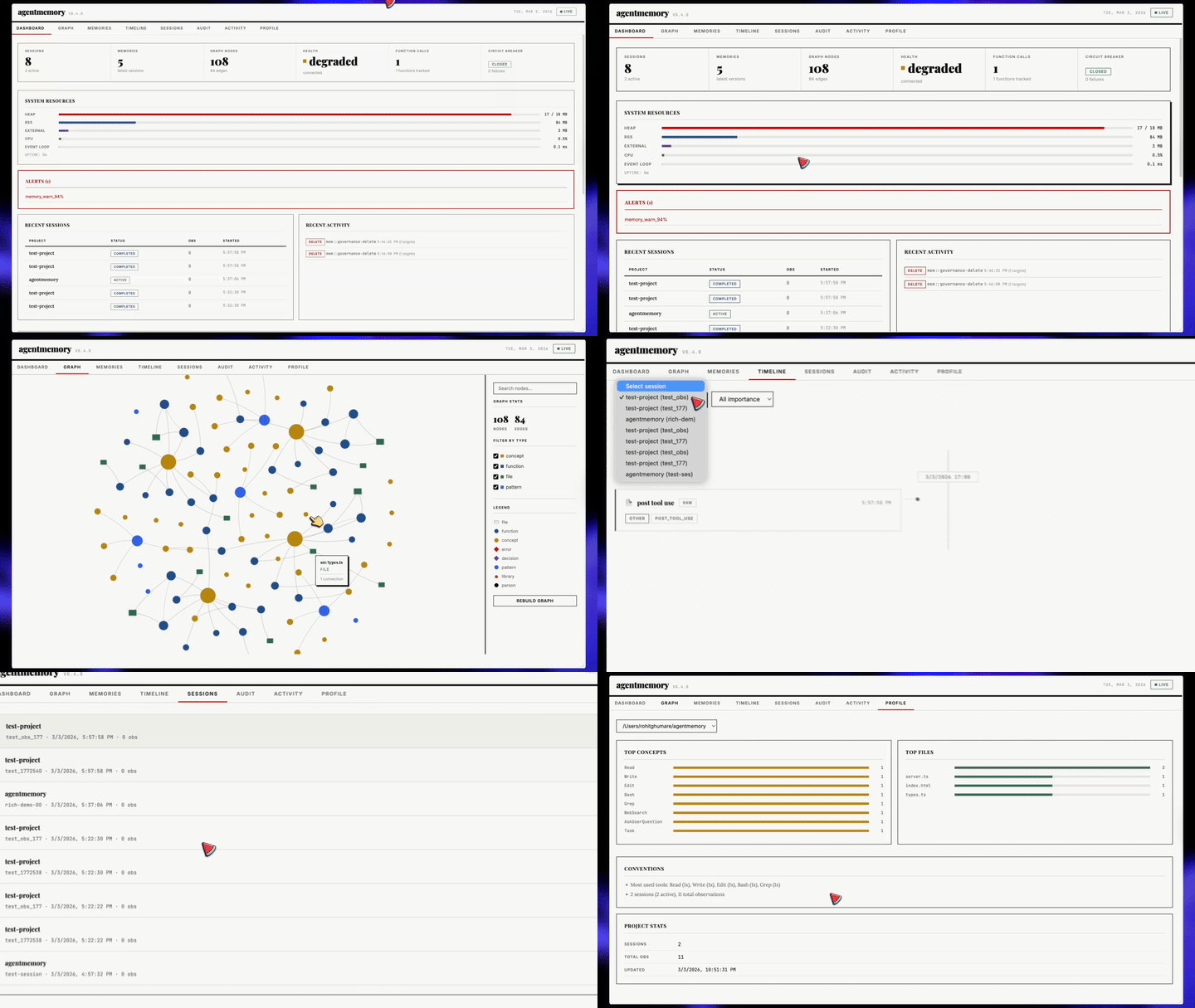
Open http://localhost:3113 to watch the memory build live.
Recommended: install globally
npx caches per-version. If you ran npx @agentmemory/agentmemory@0.9.14 last week, a bare npx @agentmemory/agentmemory may serve the stale 0.9.14 from ~/.npm/_npx/, not the latest release. Install once and the bare agentmemory command works everywhere:
npm install -g @agentmemory/agentmemory
agentmemory                    # start the server (same as the npx form)
agentmemory stop               # tear it down
agentmemory remove             # uninstall everything we created
agentmemory connect claude-code   # wire one agent
agentmemory doctor             # interactive diagnostics + fix prompts
From v0.9.16 onward, the first npx run prompts you to install globally inline — answer Y once and you're set. If you skip, fall back to either of these for a fresh fetch:
npx -y @agentmemory/agentmemory@latest                 # forces latest from npm (cross-platform)
rm -rf ~/.npm/_npx && npx @agentmemory/agentmemory     # macOS/Linux only (POSIX shell)
On Windows / PowerShell, the equivalent cache clear is Remove-Item -Recurse -Force "$env:LOCALAPPDATA\npm-cache\_npx" — the npx -y ...@latest form above is the cross-platform option.
Session Replay
Every session agentmemory records is replayable. Open the viewer, pick the Replay tab, and scrub through the timeline: prompts, tool calls, tool results, and responses render as discrete events with play/pause, speed control (0.5×–4×), and keyboard shortcuts (space to toggle, arrows to step).
Already have older Claude Code JSONL transcripts you want to bring in?
# Import everything under the default ~/.claude/projects
npx @agentmemory/agentmemory import-jsonl

# Or import a single file
npx @agentmemory/agentmemory import-jsonl ~/.claude/projects/-my-project/abc123.jsonl
Imported sessions show up in the Replay picker alongside native ones. Under the hood each entry routes through the mem::replay::load, mem::replay::sessions, and mem::replay::import-jsonl iii functions — no side-channel servers.
Upgrade / Maintenance
Use the maintenance command when you intentionally want to update your local runtime:
npx @agentmemory/agentmemory upgrade
Warning: this command mutates the current workspace/runtime. It can update JavaScript dependencies, may run cargo install iii-engine --force, and may pull Docker images.
Implementation details live in src/cli.ts (see runUpgrade around the src/cli.ts:544-595 region).
Claude Code (one block, paste it)
Install agentmemory: run `npx @agentmemory/agentmemory` in a separate terminal to start the memory server. Then run `/plugin marketplace add rohitg00/agentmemory` and `/plugin install agentmemory` — the plugin registers all 12 hooks, 4 skills, AND auto-wires the `@agentmemory/mcp` stdio server via its `.mcp.json`, so you get 51 MCP tools (memory_smart_search, memory_save, memory_sessions, memory_governance_delete, etc.) without any extra config step. Verify with `curl http://localhost:3111/agentmemory/health`. The real-time viewer is at http://localhost:3113.
Codex CLI (Codex plugin platform)
# 1. start the memory server in a separate terminal
npx @agentmemory/agentmemory

# 2. register the agentmemory marketplace and install the plugin
codex plugin marketplace add rohitg00/agentmemory
codex plugin install agentmemory
The Codex plugin ships from the same plugin/ directory as the Claude Code plugin. It registers:
@agentmemory/mcpas an MCP server (proxies all 51 tools whenAGENTMEMORY_URLpoints at a running agentmemory server; falls back to 7 tools locally when no server is reachable)- 6 lifecycle hooks:
SessionStart,UserPromptSubmit,PreToolUse,PostToolUse,PreCompact,Stop - 4 skills:
/recall,/remember,/session-history,/forget
Codex's hook engine injects CLAUDE_PLUGIN_ROOT into hook subprocesses (per codex-rs/hooks/src/engine/discovery.rs), so the same hook scripts work across both hosts without duplication. Subagent / SessionEnd / Notification / TaskCompleted / PostToolUseFailure events are Claude-Code-only and are not registered for Codex.
OpenClaw (paste this prompt)
Install agentmemory for OpenClaw. Run `npx @agentmemory/agentmemory` in a separate terminal to start the memory server on localhost:3111. Then add this to my OpenClaw MCP config so agentmemory is available with all 51 memory tools:

{
  "mcpServers": {
    "agentmemory": {
      "command": "npx",
      "args": ["-y", "@agentmemory/mcp"],
      "env": {
        "AGENTMEMORY_URL": "http://localhost:3111"
      }
    }
  }
}

Restart OpenClaw. Verify with `curl http://localhost:3111/agentmemory/health`. Open http://localhost:3113 for the real-time viewer. For deeper memory-slot integration, copy `integrations/openclaw` to `~/.openclaw/extensions/agentmemory` and enable `plugins.slots.memory = "agentmemory"` in `~/.openclaw/openclaw.json`.
Full guide: integrations/openclaw/
Hermes Agent (paste this prompt)
Install agentmemory for Hermes. Run `npx @agentmemory/agentmemory` in a separate terminal to start the memory server on localhost:3111. Then add this to ~/.hermes/config.yaml so Hermes can use agentmemory as an MCP server with all 51 memory tools:

mcp_servers:
  agentmemory:
    command: npx
    args: ["-y", "@agentmemory/mcp"]

memory:
  provider: agentmemory

Verify with `curl http://localhost:3111/agentmemory/health`. Open http://localhost:3113 for the real-time viewer. For deeper 6-hook memory provider integration (pre-LLM context injection, turn capture, MEMORY.md mirroring, system prompt block), copy integrations/hermes from the agentmemory repo to ~/.hermes/plugins/agentmemory.
Full guide: integrations/hermes/
Other agents
Start the memory server: npx @agentmemory/agentmemory
The agentmemory entry is the same MCP server block across every host that uses the mcpServers shape (Cursor, Claude Desktop, Cline, Roo Code, Windsurf, Gemini CLI, OpenClaw):
"agentmemory": {
  "command": "npx",
  "args": ["-y", "@agentmemory/mcp"],
  "env": {
    "AGENTMEMORY_URL": "http://localhost:3111"
  }
}
Merge this entry into the existing mcpServers object in the host's config file — don't replace the file. If the file already has other servers, add agentmemory next to them as another key inside mcpServers. If mcpServers is missing entirely, paste the block inside { "mcpServers": { ... } }.
| Agent | Config file | Notes |
|---|---|---|
| Cursor | ~/.cursor/mcp.json |
Merge into mcpServers. One-click deeplink also available on the website. |
| Claude Desktop | claude_desktop_config.json (Application Support) |
Merge into mcpServers. Restart Claude Desktop after editing. |
| Cline / Roo Code / Kilo Code | Cline MCP settings (Settings UI → MCP Servers → Edit) | Same mcpServers block. |
| Windsurf | ~/.codeium/windsurf/mcp_config.json |
Same mcpServers block. |
| Gemini CLI | ~/.gemini/settings.json |
gemini mcp add agentmemory npx -y @agentmemory/mcp --scope user (auto-merges). |
| OpenClaw | OpenClaw MCP config | Same mcpServers block, or use the deeper memory plugin. |
| Codex CLI (MCP only) | .codex/config.toml |
TOML shape: codex mcp add agentmemory -- npx -y @agentmemory/mcp, or add [mcp_servers.agentmemory] manually. |
| Codex CLI (full plugin) | Codex plugin marketplace | codex plugin marketplace add rohitg00/agentmemory then codex plugin install agentmemory. Registers MCP + 6 lifecycle hooks (SessionStart, UserPromptSubmit, PreToolUse, PostToolUse, PreCompact, Stop) + 4 skills. |
| OpenCode | opencode.json |
Different shape — top-level mcp key, command as array: {"mcp": {"agentmemory": {"type": "local", "command": ["npx", "-y", "@agentmemory/mcp"], "enabled": true}}}. |
| pi | ~/.pi/agent/extensions/agentmemory |
Copy integrations/pi and restart pi. |
| Hermes Agent | ~/.hermes/config.yaml |
Use the deeper memory provider plugin with memory.provider: agentmemory. |
| Goose | Goose MCP settings UI | Same mcpServers block. |
| Aider | n/a | Talk to the REST API directly: curl -X POST http://localhost:3111/agentmemory/smart-search -d '{"query": "auth"}'. |
| Any agent (32+) | n/a | npx skillkit install agentmemory auto-detects the host and merges. |
Sandboxed MCP clients (Flatpak / Snap / restrictive containers) that can't reach the host's localhost: also set "AGENTMEMORY_FORCE_PROXY": "1" in the env block, and point AGENTMEMORY_URL at a route the sandbox can actually reach (e.g. your LAN IP). See #234 for the diagnostic walkthrough.
Programmatic access (Python / Rust / Node)
agentmemory registers its core operations as iii functions (mem::remember, mem::observe, mem::context, mem::smart-search, mem::forget). Any language with an iii SDK can call them directly over ws://localhost:49134 — no separate REST client per language.
pip install iii-sdk         # Python
cargo add iii-sdk           # Rust
npm  install iii-sdk        # Node
from iii import register_worker

iii = register_worker("ws://localhost:49134")
iii.connect()

iii.trigger({
    "function_id": "mem::smart-search",
    "payload": {"project": "demo", "query": "how do tokens refresh"},
})
Worked example: examples/python/ (quickstart + observation/recall flow). REST on :3111 remains available for hosts without an iii runtime.
From source
git clone https://github.com/rohitg00/agentmemory.git && cd agentmemory
npm install && npm run build && npm start
This starts agentmemory with a local iii-engine if iii is already installed, or falls back to Docker Compose if Docker is available. REST, streams, and the viewer bind to 127.0.0.1 by default.
Install iii-engine manually. agentmemory currently pins iii-engine to v0.11.2 — v0.11.6 introduces a new sandbox-everything-via-iii worker add model that agentmemory hasn't been refactored for yet. Pin lifts once the refactor lands. Override with AGENTMEMORY_III_VERSION=<version> if you've migrated to the sandbox model manually.
- macOS arm64:
mkdir -p ~/.local/bin && curl -fsSL https://github.com/iii-hq/iii/releases/download/iii/v0.11.2/iii-aarch64-apple-darwin.tar.gz | tar -xz -C ~/.local/bin && chmod +x ~/.local/bin/iii - macOS x64: swap
aarch64-apple-darwinforx86_64-apple-darwin - Linux x64: swap for
x86_64-unknown-linux-gnu - Linux arm64: swap for
aarch64-unknown-linux-gnu - Windows: download
iii-x86_64-pc-windows-msvc.zipfrom iii-hq/iii releases v0.11.2, extractiii.exe, add to PATH
Or use Docker (the bundled docker-compose.yml pulls iiidev/iii:0.11.2). Full docs: iii.dev/docs.
Windows
agentmemory runs on Windows 10/11, but the Node.js package alone isn't enough — you also need the iii-engine runtime (a separate native binary) as a background process. The official upstream installer is a sh script and there is no PowerShell installer or scoop/winget package today, so Windows users have two paths:
Option A — Prebuilt Windows binary (recommended):
# 1. Open https://github.com/iii-hq/iii/releases/tag/iii%2Fv0.11.2 in your browser
#    (we pin to v0.11.2 until agentmemory refactors for the new sandbox
#     model that engine v0.11.6+ requires)
# 2. Download iii-x86_64-pc-windows-msvc.zip
#    (or iii-aarch64-pc-windows-msvc.zip if you're on an ARM machine)
# 3. Extract iii.exe somewhere on PATH, or place it at:
#    %USERPROFILE%\.local\bin\iii.exe
#    (agentmemory checks that location automatically)
# 4. Verify:
iii --version
# Should print: 0.11.2

# 5. Then run agentmemory as usual:
npx -y @agentmemory/agentmemory
Option B — Docker Desktop:
# 1. Install Docker Desktop for Windows
# 2. Start Docker Desktop and make sure the engine is running
# 3. Run agentmemory — it will auto-start the bundled compose file:
npx -y @agentmemory/agentmemory
Option C — standalone MCP only (no engine): if you only need the MCP tools for your agent and don't need the REST API, viewer, or cron jobs, skip the engine entirely:
npx -y @agentmemory/agentmemory mcp
# or via the shim package:
npx -y @agentmemory/mcp
Diagnostics for Windows: if npx @agentmemory/agentmemory fails, re-run with --verbose to see the actual engine stderr. Common failure modes:
| Symptom | Fix |
|---|---|
iii-engine process started then did not become ready within 15s |
Engine crashed on startup — re-run with --verbose, check stderr |
Could not start iii-engine |
Neither iii.exe nor Docker is installed. See Option A or B above |
| Port conflict | netstat -ano | findstr :3111 to see what's bound, then kill it or use --port <N> |
| Docker fallback skipped even though Docker is installed | Make sure Docker Desktop is actually running (system tray icon) |
Note: there is no
cargo install iii-engine—iiiis not published to crates.io. The only supported install methods are the prebuilt binary above, the upstreamshinstall script (macOS/Linux only), and the Docker image.
Deploy
One-click templates for managed hosts. Each one ships a self-contained
Dockerfile that pulls @agentmemory/agentmemory from npm and copies
the iii engine binary in from the official iiidev/iii Docker Hub
image — no pre-built agentmemory image required. Persistent storage
mounts at /data; the first-boot entrypoint overwrites the
npm-bundled iii config (which binds 127.0.0.1) with a deploy-tuned
one that binds 0.0.0.0 and uses absolute /data paths, generates
the HMAC secret, then drops privileges from root to node via
gosu before exec'ing the agentmemory CLI.
MCP server for adaptive web scraping — bypasses anti-bot systems, auto-relocates elements on page changes Open-source financial data platform for AI agents — consolidates proprietary, licensed, and public data sources Multi-agent orchestration MCP server for Claude Code — deploys swarms, coordinates workflows, learns from outcomes MCP server for algorithmic trading — turns natural language into executable strategies, research, and portfolio analysis
Similar mcp servers
Scrapling
OpenBB
ruflo
Vibe-Trading


