ccflare
API proxy server for Anthropic and OpenAI — load balances accounts, tracks usage, and routes requests
ccflare is a self-hostable API proxy for Anthropic and OpenAI, designed for developers managing multiple API keys and rate limits. It provides native passthrough routing, automatic account failover, and comprehensive observability with a dashboard and request history. Supports API key and OAuth authentication, including Claude Code OAuth, and integrates with existing SDKs by simply changing the base URL.
- Native passthrough proxy for Anthropic and OpenAI APIs
- Multi-provider routing by URL prefix or model family
- Automatic account failover on rate limits across multiple keys
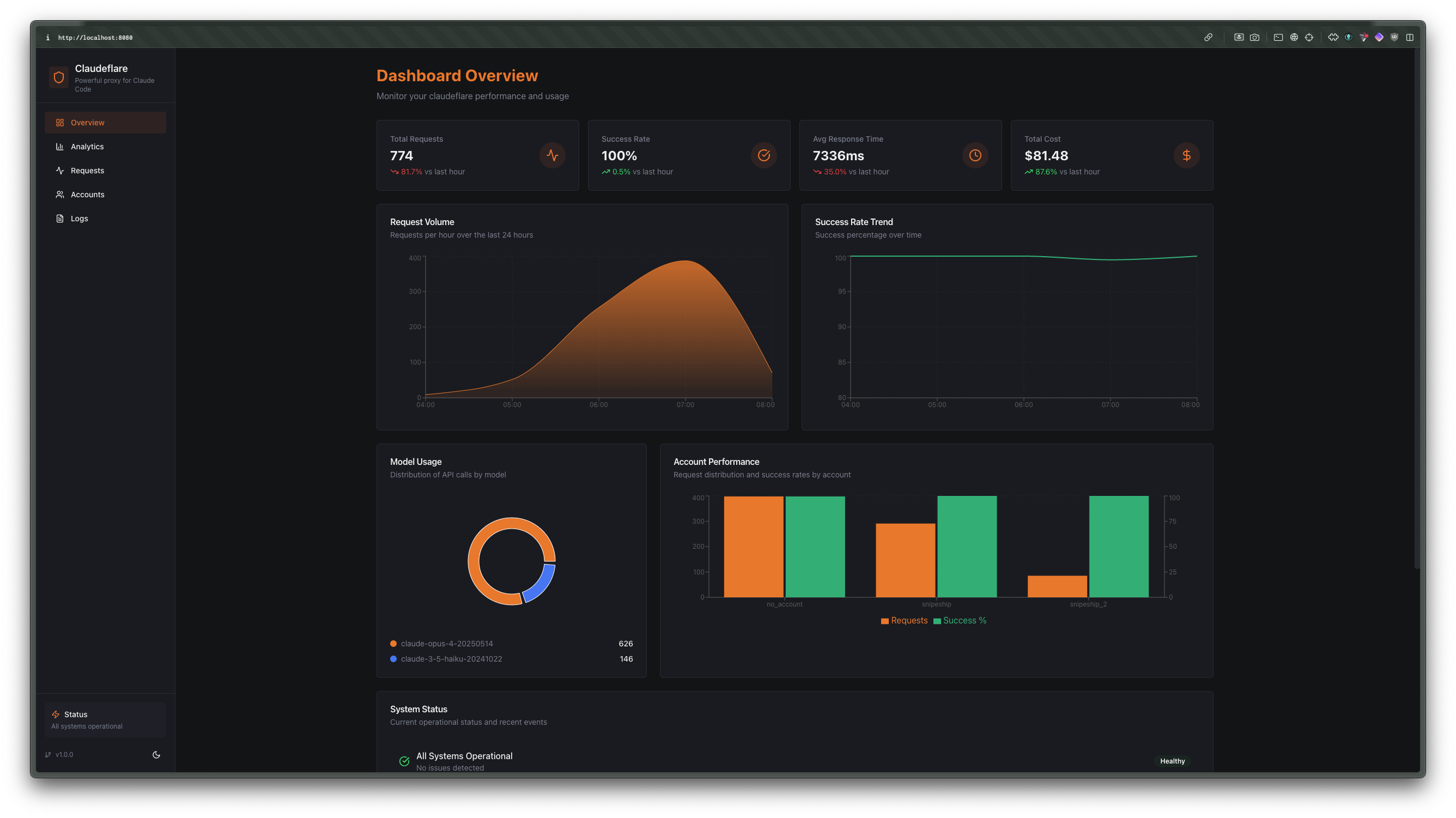
- Built-in dashboard for request history, analytics, and logs
- Flexible API key and OAuth account authentication


README
View on GitHub ↗ccflare 🛡️
A multi-provider native proxy for Anthropic and OpenAI.
ccflare routes each provider by URL prefix, load-balances across multiple accounts, and keeps full request history, rate-limit state, and usage analytics without translating provider payloads.
Why ccflare?
- Native passthrough — Anthropic stays Anthropic, OpenAI stays OpenAI
- Multi-provider routing — route by
/v1/{provider}/* - Compatibility routes — route by
/v1/ccflare/*with family-prefixed models - Account failover — retry another account when one provider account is rate limited
- Built-in observability — dashboard, request history, analytics, logs, and health endpoints
- Flexible auth — API key and OAuth account support
Quick start
git clone https://github.com/snipeship/ccflare
cd ccflare
bun install

# Start the server + dashboard on http://localhost:8080
bun run start

# Or launch the TUI, which can also start the server
bun run ccflare
Verify the server is up:
curl http://localhost:8080/health
How routing works
ccflare proxies requests by provider prefix:
http://localhost:8080/v1/anthropic/*http://localhost:8080/v1/openai/*http://localhost:8080/v1/ccflare/*
Examples:
/v1/anthropic/v1/messages→https://api.anthropic.com/v1/messages/v1/openai/chat/completions→https://api.openai.com/v1/chat/completions/v1/openai/responses→https://api.openai.com/v1/responses
The /v1/{provider} prefix is stripped exactly once before forwarding upstream.
Compatibility routes keep the client-facing schema but select a provider family from
the model prefix:
openai/<model-id>→ preferscodex, thenopenaianthropic/<model-id>→ prefersclaude-code, thenanthropic
Examples:
/v1/ccflare/openai/chat/completionswith"model":"openai/gpt-5.4"/v1/ccflare/openai/responseswith"model":"anthropic/claude-sonnet-4"/v1/ccflare/anthropic/messageswith"model":"openai/gpt-4o-mini"
Account setup
API key accounts
Add accounts through the management API:
curl -X POST http://localhost:8080/api/accounts \
  -H "content-type: application/json" \
  -d '{
    "name": "anthropic-main",
    "provider": "anthropic",
    "auth_method": "api_key",
    "api_key": "sk-ant-..."
  }'

curl -X POST http://localhost:8080/api/accounts \
  -H "content-type: application/json" \
  -d '{
    "name": "openai-main",
    "provider": "openai",
    "auth_method": "api_key",
    "api_key": "sk-openai-..."
  }'
OAuth accounts
Use the CLI/TUI for interactive OAuth setup:
# Claude Code OAuth
bun run ccflare --add-account work --provider claude-code

# Codex OAuth
bun run ccflare --add-account codex --provider codex
The management API also exposes provider-specific auth endpoints:
POST /api/auth/anthropic/initPOST /api/auth/anthropic/completePOST /api/auth/openai/initPOST /api/auth/openai/complete
Provider configuration
Anthropic clients
Point Anthropic SDKs or curl at the Anthropic-prefixed base URL:
export ANTHROPIC_BASE_URL=http://localhost:8080/v1/anthropic
OpenAI clients
Point OpenAI-compatible clients at the OpenAI-prefixed base URL:
export OPENAI_BASE_URL=http://localhost:8080/v1/openai
You can configure both providers at the same time and ccflare will keep account selection isolated per provider.
Example usage
Anthropic example
curl -X POST http://localhost:8080/v1/anthropic/v1/messages \
  -H "content-type: application/json" \
  -d '{
    "model": "claude-3-7-sonnet",
    "max_tokens": 128,
    "messages": [
      { "role": "user", "content": "Say hello from ccflare." }
    ]
  }'
OpenAI chat completions example
curl -X POST http://localhost:8080/v1/openai/chat/completions \
  -H "content-type: application/json" \
  -d '{
    "model": "gpt-4o-mini",
    "messages": [
      { "role": "user", "content": "Say hello from ccflare." }
    ]
  }'
OpenAI Responses API example
curl -X POST http://localhost:8080/v1/openai/responses \
  -H "content-type: application/json" \
  -d '{
    "model": "gpt-4o",
    "input": "Summarize why provider-prefixed routing is useful."
}'
ccflare compatibility example
curl -X POST http://localhost:8080/v1/ccflare/openai/chat/completions \
  -H "content-type: application/json" \
  -d '{
    "model": "anthropic/claude-sonnet-4",
    "messages": [
      { "role": "user", "content": "Say hello from the compatibility route." }
    ]
  }'
Management API
Key endpoints:
GET /health— status, account count, strategy, supported providersGET /api/accounts— list accountsPOST /api/accounts— create an accountPATCH /api/accounts/:id— update an account (rename, changebase_url)DELETE /api/accounts/:id— remove an accountPOST /api/accounts/:id/pause/resume— exclude or restore an accountPOST /api/accounts/:id/rename— rename an accountGET /api/requests— recent request summariesGET /api/requests/detail— detailed request info with payloadsGET /api/requests/stream— live request stream via SSEGET /api/analytics— aggregated analyticsGET /api/stats— usage and performance statsPOST /api/stats/reset— reset usage statisticsGET /api/logs/stream— live server logs via SSEGET /api/logs/history— historical log entriesGET /api/config— current configurationGET /api/config/strategy— current load balancing strategyPOST /api/config/strategy— update load balancing strategyGET /api/strategies— list available strategiesGET /api/config/retention— data retention settingsPOST /api/config/retention— update data retention settingsPOST /api/maintenance/cleanup— run data cleanupPOST /api/maintenance/compact— compact the database
UI and developer tools
- Dashboard:
http://localhost:8080 - TUI:
bun run ccflare - Server only:
bun run start
Requirements
- Bun >= 1.2.8
- Anthropic and/or OpenAI credentials
Documentation
Additional repo docs live in docs/:
License
MIT — see LICENSE.
Similar other
freeCodeCamp
Open-source coding curriculum — learn full-stack web development, Python, and computer science for free


Python
Python algorithms collection — a vast, community-driven library of data structures and algorithms for education


rtk
CLI proxy for LLMs — reduces token consumption by 60-90% on common dev commands


medusa
Open-source e-commerce platform — provides a customizable framework for building digital commerce applications


