claude-code-agents
Claude Code plugin for solo devs — automates parallel code audits, bug fixes, and deployments with 24 subagents
This Claude Code plugin provides a complete end-to-end development workflow for solo developers, automating tasks like parallel code audits, bug fixes, and deployments. It includes 24 specialized subagent definitions and 6 workflow skills, optimized for Next.js/React/TypeScript stacks. Agents operate under strict protocols to ensure controlled, reliable execution and prevent common AI pitfalls.
- 24 specialized subagents for auditing, fixing, and deploying
- 6 workflow skills for common dev tasks like /full-audit
- Strict protocols prevent rogue agent behavior and ensure control
- Optimized for Next.js, React, TypeScript, Prisma, npm/pnpm
- Generates detailed audit reports in .claude/audits/


README
View on GitHub ↗Complete E2E Development Workflow


For Solo Dev Startups Building with Next.js + Claude Code
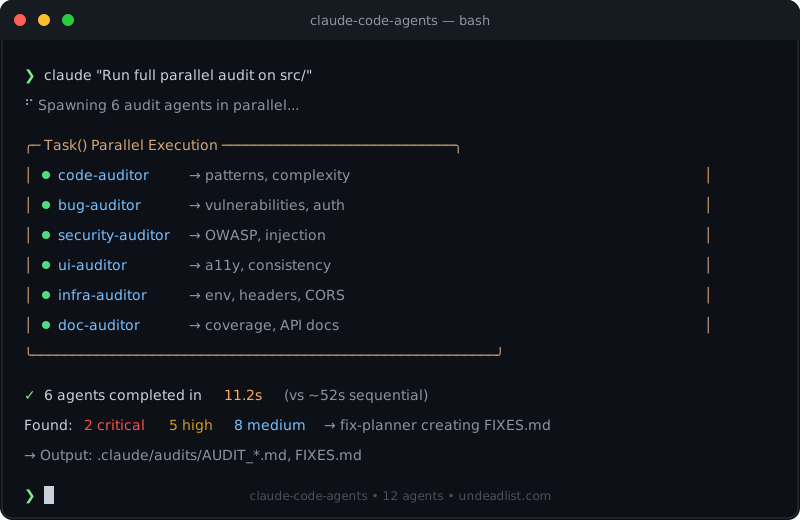
Target User: Solo dev running a startup, only engineer, entire company. Goal: Pull this repo into any project and have a full agent team ready to go. Designed for: Next.js / React / TypeScript full-stack web apps (Prisma, npm/pnpm, Vercel). Other stacks can adapt the agent prompts, but examples and tooling defaults target this stack. Built by: Paul @ UndeadList — learned the hard way what works.
The Reality Check
You're a solo dev. You don't have:
- A QA team
- A code reviewer
- A DevOps engineer
- Time to waste on AI agents going rogue
This workflow package gives you all of that via Claude Code subagents, with strict protocols to prevent the bullshit that wastes your time.
What's In This Repo
claude-code-agents/
├── .claude-plugin/
│   ├── plugin.json                 # Plugin manifest
│   └── marketplace.json            # Marketplace config
│
├── agents/                         # 24 agent definitions
│   ├── # AUDIT AGENTS (11 - run in parallel)
│   ├── code-auditor.md             # Code quality, DRY, complexity
│   ├── bug-auditor.md              # Runtime bugs, auth gaps
│   ├── security-auditor.md         # OWASP deep scan
│   ├── doc-auditor.md              # Documentation gaps
│   ├── infra-auditor.md            # Config, env vars, headers
│   ├── ui-auditor.md               # Accessibility, UX
│   ├── db-auditor.md               # Database, N+1, indexes
│   ├── perf-auditor.md             # Performance, bundle size
│   ├── dep-auditor.md              # Dependencies, vulnerabilities
│   ├── seo-auditor.md              # SEO, meta tags, OpenGraph
│   ├── api-tester.md               # API endpoint testing
│   ├── # FIX/IMPLEMENT AGENTS (4)
│   ├── fix-planner.md              # Prioritizes findings into FIXES.md
│   ├── code-fixer.md               # Implements fixes
│   ├── test-runner.md              # Validates fixes
│   ├── test-writer.md              # Auto-generates tests
│   ├── # BROWSER AGENTS (4 - Chrome integration)
│   ├── browser-qa-agent.md         # Navigates UI, finds console errors
│   ├── fullstack-qa-orchestrator.md  # Find → Fix → Verify loop
│   ├── console-monitor.md          # Real-time console watching
│   ├── visual-diff.md              # Screenshot comparison
│   ├── # DEPLOY AGENTS (2)
│   ├── deploy-checker.md           # Pre-deployment validation
│   ├── env-validator.md            # Environment configuration
│   ├── # UTILITY AGENTS (2)
│   ├── pr-writer.md                # PR description generator
│   ├── seed-generator.md           # Test data creation
│   └── # SUPERVISORS (1)
│   └── architect-reviewer.md       # Oversees until production-ready
│
├── skills/                         # 6 workflow skills (slash commands)
│   ├── full-audit/SKILL.md         # /full-audit
│   ├── pre-commit/SKILL.md         # /pre-commit
│   ├── pre-deploy/SKILL.md         # /pre-deploy
│   ├── new-feature/SKILL.md        # /new-feature
│   ├── bug-fix/SKILL.md            # /bug-fix
│   └── release-prep/SKILL.md       # /release-prep
│
├── workflows/                      # Detailed workflow documentation
│   ├── pre-commit.md
│   ├── pre-deploy.md
│   ├── full-audit.md
│   ├── new-feature.md
│   ├── bug-fix.md
│   └── release-prep.md
│
├── CLAUDE.md                       # Orchestrator instructions
├── setup-project.sh                # One command setup for new projects
├── install.sh                      # Quick agent install (legacy)
└── README.md
Total: 24 agents + 6 workflow skills
Quick Start
Install as Plugin (Recommended)
Install once, use across all projects. No per-project file copying needed.
# Step 1: Add the marketplace (inside Claude Code)
/plugin marketplace add undeadlist/claude-code-agents

# Step 2: Install the plugin (inside Claude Code)
/plugin install claude-code-agents@undeadlist-claude-code-agents
Or after Step 1, use /plugin → Discover tab to browse and install.
You can also install from the terminal:
claude plugin install claude-code-agents@undeadlist-claude-code-agents --scope user
All 24 agents and 6 workflow skills become natively available. Use skills like /full-audit, /pre-commit, /pre-deploy, etc.
Verify Your Install
After installing, confirm everything loaded:
# Inside Claude Code, ask:
"List all available agents and skills from the claude-code-agents plugin"
You should see 24 agents and 6 skills. If not, check the Troubleshooting section below.
Try Before Installing
Test the plugin locally without installing:
git clone https://github.com/undeadlist/claude-code-agents.git
claude --plugin-dir ./claude-code-agents
This loads the plugin for that session only — nothing is installed globally.
Alternative Installation (Per-Project)
If you prefer per-project installation:
# Option A: Full setup (creates CLAUDE.md, detects stack)
curl -s https://undeadlist.com/agents/setup-project.sh | bash

# Option B: Just agents
curl -s https://undeadlist.com/agents/install.sh | bash

# Option C: Via npm
npx claude-code-agents
This copies agents into your project's .claude/agents/ directory.
Stack Compatibility
These agents are optimized for Next.js / React / TypeScript projects using Prisma, npm/pnpm, and Vercel. Commands, file paths, and examples throughout the agent prompts reflect this stack.
Stack-agnostic agents (useful for any project):
security-auditor— OWASP checks apply to any web appcode-auditor— quality principles are language-agnosticdoc-auditor— documentation gap analysis works everywherepr-writer— generates PR descriptions for any git repofix-planner— prioritization logic is framework-independentarchitect-reviewer— review criteria are generic
Adapting for other stacks: Fork the repo and edit the agent .md files in agents/. Swap Next.js-specific commands (npm run dev, pnpm tsc, localhost:3000) for your equivalents. The orchestration structure works regardless of stack — only the tool-specific examples need changing.
Workflows
Pre-Commit
claude "Run pre-commit workflow"
Runs code-auditor + test-runner before committing.
Pre-Deploy
claude "Run pre-deploy workflow"
Validates build, env vars, dependencies before deployment.
Full Audit
claude "Run full-audit workflow on src/"
All 11 auditors in parallel → fix-planner creates FIXES.md.
New Feature
claude "Run new-feature workflow for: [feature description]"
test-writer → code-fixer → test-runner → browser-qa (TDD approach).
Bug Fix
claude "Run bug-fix workflow for: [bug description]"
Write failing test → fix → verify (regression prevention).
Release Prep
claude "Run release-prep workflow for v1.0.0"
Full audit → fixes → deploy validation → PR generation.
Project Lifecycle
Phase 0: New Project Setup
curl -s https://undeadlist.com/agents/setup-project.sh | bash
Phase 1: Skeleton/Scaffolding
Before touching code, create your blueprint:
claude "Create a SETUP_BLUEPRINT.md for this project:
- Folder structure
- Tech stack decisions (with rationale)
- Dependencies list (don't install yet)
- Environment variables needed
- Database planning
- Success criteria checklist

Do NOT generate any code. Just the plan."
Phase 2: Initial Build
Strict rules for AI agents during build:
## RULES FOR THIS SESSION

1. **ASK BEFORE** modifying any file not directly related to current task
2. **NEVER** refactor "while you're in there"
3. **NEVER** update dependencies unless explicitly requested
4. **NEVER** change config files without approval
5. **ONE logical change per commit**
6. **VERIFY** the build works after each change
Phase 3: Development Loop
The core loop for any task:
┌─────────────────────────────────────────────────┐
│  1. Understand the task                         │
│  2. State what files you'll touch               │
│  3. Get approval                                │
│  4. Make ONE change                             │
│  5. Verify it works                             │
│  6. Commit                                      │
│  7. Repeat                                      │
└─────────────────────────────────────────────────┘
Phase 4: Pre-Launch Audit
Run the full parallel audit:
claude "Run full-audit workflow on src/"
Review .claude/audits/ for:
- AUDIT_CODE.md, AUDIT_SECURITY.md, AUDIT_DB.md, AUDIT_PERF.md
- FIXES.md (prioritized action items)
Phase 5: Browser QA
Enable Chrome integration:
/chrome
Run the full QA loop:
claude "Use fullstack-qa-orchestrator to:
1. Start dev server (npm run dev)
2. Navigate to http://localhost:3000
3. Test: homepage, auth flow, main features
4. Find console errors, UI bugs
5. Fix issues found
6. Re-test to verify
7. Repeat until clean"
Phase 6: Deploy
claude "Run pre-deploy workflow"
The Protocols
Protocol 1: No Unauthorized Changes
Every AI agent must follow:
## BEFORE ANY CHANGE

1. State what file you're modifying
2. State what change you're making
3. State why
4. Wait for "PROCEED" or "STOP"

## FORBIDDEN ACTIONS

- ❌ npm install / npx anything without approval
- ❌ Modifying package.json without approval
- ❌ Creating new files when editing existing works
- ❌ Refactoring unrelated code
- ❌ "Improvements" not requested
- ❌ Touching config files without approval
Protocol 2: Micro-Checkpoint Method
For complex changes:
## EVERY PHASE:

1. Agent states planned change
2. Agent calls architect-reviewer for verification
3. User says "PROCEED" or "STOP"
4. Agent makes ONE change
5. Agent verifies change applied correctly
6. Proceed to next phase only with approval
Protocol 3: Regression Prevention
Before any change:
# Baseline testing
curl -s http://localhost:3000/api/health  # API works
pnpm tsc --noEmit                          # TypeScript valid
pnpm test                                   # Tests pass

# After change - all must still work
Common Commands
Daily Development
# Start coding session
claude "Review CLAUDE.md, then help me with [task]"

# Quick check before commit
claude "Run pre-commit workflow"

# Verify a specific file
claude "Review [file] for bugs, especially [concern area]"
Pre-Launch
# Full audit
claude "Run full-audit workflow on src/"

# Browser QA
claude "Use fullstack-qa-orchestrator to test http://localhost:3000"

# Security focus
claude "Use security-auditor to deep scan src/api/"
Debugging
# Console monitoring
claude "Use console-monitor to watch http://localhost:3000"

# Specific bug
claude "Run bug-fix workflow for: [bug description]"
Files Generated
All reports go to .claude/audits/ (gitignored):
| File | Source Agent |
|---|---|
| AUDIT_CODE.md | code-auditor |
| AUDIT_SECURITY.md | bug-auditor |
| AUDIT_SECURITY_DEEP.md | security-auditor |
| AUDIT_DOCS.md | doc-auditor |
| AUDIT_INFRA.md | infra-auditor |
| AUDIT_UI_UX.md | ui-auditor |
| AUDIT_DB.md | db-auditor |
| AUDIT_PERF.md | perf-auditor |
| AUDIT_DEPS.md | dep-auditor |
| AUDIT_SEO.md | seo-auditor |
| API_TEST_REPORT.md | api-tester |
| DEPLOY_CHECK.md | deploy-checker |
| ENV_REPORT.md | env-validator |
| FIXES.md | fix-planner |
| TEST_REPORT.md | test-runner |
| AUDIT_BROWSER_QA.md | browser-qa-agent |
| QA_SESSION_LOG.md | fullstack-qa-orchestrator |
Quick Reference
| Task | Command |
|---|---|
| New project setup | curl -s https://undeadlist.com/agents/setup-project.sh | bash |
| Enable browser QA | /chrome in Claude Code |
| Pre-commit check | "Run pre-commit workflow" |
| Full audit | "Run full-audit workflow on src/" |
| Pre-deploy check | "Run pre-deploy workflow" |
| Browser test | "Use browser-qa-agent to test localhost:3000" |
| Full QA loop | "Use fullstack-qa-orchestrator..." |
| New feature | "Run new-feature workflow for: [feature]" |
| Bug fix | "Run bug-fix workflow for: [bug]" |
| Release prep | "Run release-prep workflow for v1.0.0" |
| Verify production-ready | "Use architect-reviewer..." |
When AI Goes Rogue
Red Flags - STOP Immediately
- Agent makes changes without asking
- Agent installs packages without approval
- Agent modifies config files unexpectedly
- Agent claims success without verification
- Agent skips checkpoints
- Agent touches files outside scope
Recovery Commands
# Revert last change
git checkout -- [file]

# Revert all changes
git reset --hard HEAD

# Check what changed
git diff
Enforcement Phrases
"STOP. You didn't ask permission."
"STOP. That's not in scope."
"STOP. Verify it works before claiming done."
"STOP. One change at a time."
Troubleshooting
Plugin not loading / no agents found
- Check plugin errors: Run
/plugininside Claude Code and check the Errors tab - Verify marketplace was added: Go to
/plugin→ Marketplaces tab — you should seeundeadlist-claude-code-agents - Verify plugin is installed: Go to
/plugin→ Installed tab — you should seeclaude-code-agents - Re-add and reinstall:
/plugin marketplace add undeadlist/claude-code-agents
/plugin install claude-code-agents@undeadlist-claude-code-agents
Skills (slash commands) not appearing
Skills like /full-audit only work when installed as a plugin. Per-project installs (npx claude-code-agents) install agents to .claude/agents/ but don't register slash commands — use natural language instead:
claude "Run full-audit workflow on src/"
npx claude-code-agents fails
- Requires Node.js >= 14
- Must be run from a project directory
- Copies agents to
.claude/agents/and workflows toworkflows/in your project
curl installer returns 404
The setup script URL is https://undeadlist.com/agents/setup-project.sh (not setup.sh). If the CDN isn't configured, use the GitHub raw URL:
curl -sL https://raw.githubusercontent.com/undeadlist/claude-code-agents/main/install.sh | bash
Agents exist but aren't being used
Make sure your project has a CLAUDE.md that references the agents. Run setup-project.sh to auto-generate one, or see the CLAUDE.md in this repo as a template.
Uninstall
Plugin
# In Claude Code:
/plugin uninstall claude-code-agents
Per-Project Install
# Option A: One-liner (recommended)
curl -s https://raw.githubusercontent.com/undeadlist/claude-code-agents/main/uninstall.sh | bash

# Option B: Manual removal
rm -rf .claude/agents/ .claude/audits/ workflows/
This removes:
.claude/agents/- agent prompt definitions.claude/audits/- generated reports (gitignored)workflows/- predefined workflow chains
Note: CLAUDE.md is left in place. Remove manually if desired.
Contributing
Found a better protocol? Agent that should exist?
PR it: https://github.com/undeadlist/claude-code-agents
License
MIT. Use it, fork it, enhance it.
Built by UndeadList The indie software flea market
Disclaimer: Claude Code is a product of Anthropic PBC. This project is not affiliated with or endorsed by Anthropic.
"Built, but undiscovered."
Similar plugins
superpowers
Claude Code plugin for agentic software development — automates TDD, planning, and subagent coordination



everything-claude-code
Claude Code plugin: agent harness performance system with skills, memory, security, and continuous learning


andrej-karpathy-skills
Claude Code plugin for LLM coding guidelines — applies Karpathy's principles to prevent common AI coding pitfalls


claude-mem
Persistent memory for Claude Code plugin — captures, compresses, and reinjects session context


